Setup
Service catalog
The catalog arrives already preloaded: how to make it yours with your prices and durations, and what changes when you mark an entry bookable.
The service catalog is the list of jobs you sell: full service, brake bleed, chain fitting. Each entry has a price and a duration. From then on the app knows what to offer you when you write a quote, what to fill in automatically on an order line, and how much time to block in the calendar.
You don't have to build it from scratch. Every new workshop starts with a catalog already inside — the most common jobs, with indicative durations and prices — precisely so that your first quote is lines to pick, not lines to invent. The work left to you is shorter and more useful: making it your catalog.
You'll find the page under SettingsService price list. It needs the manage_service_catalog permission.
Making what's there yours#
Open the page and the list is already populated. Three things are worth the quarter of an hour, in this order:
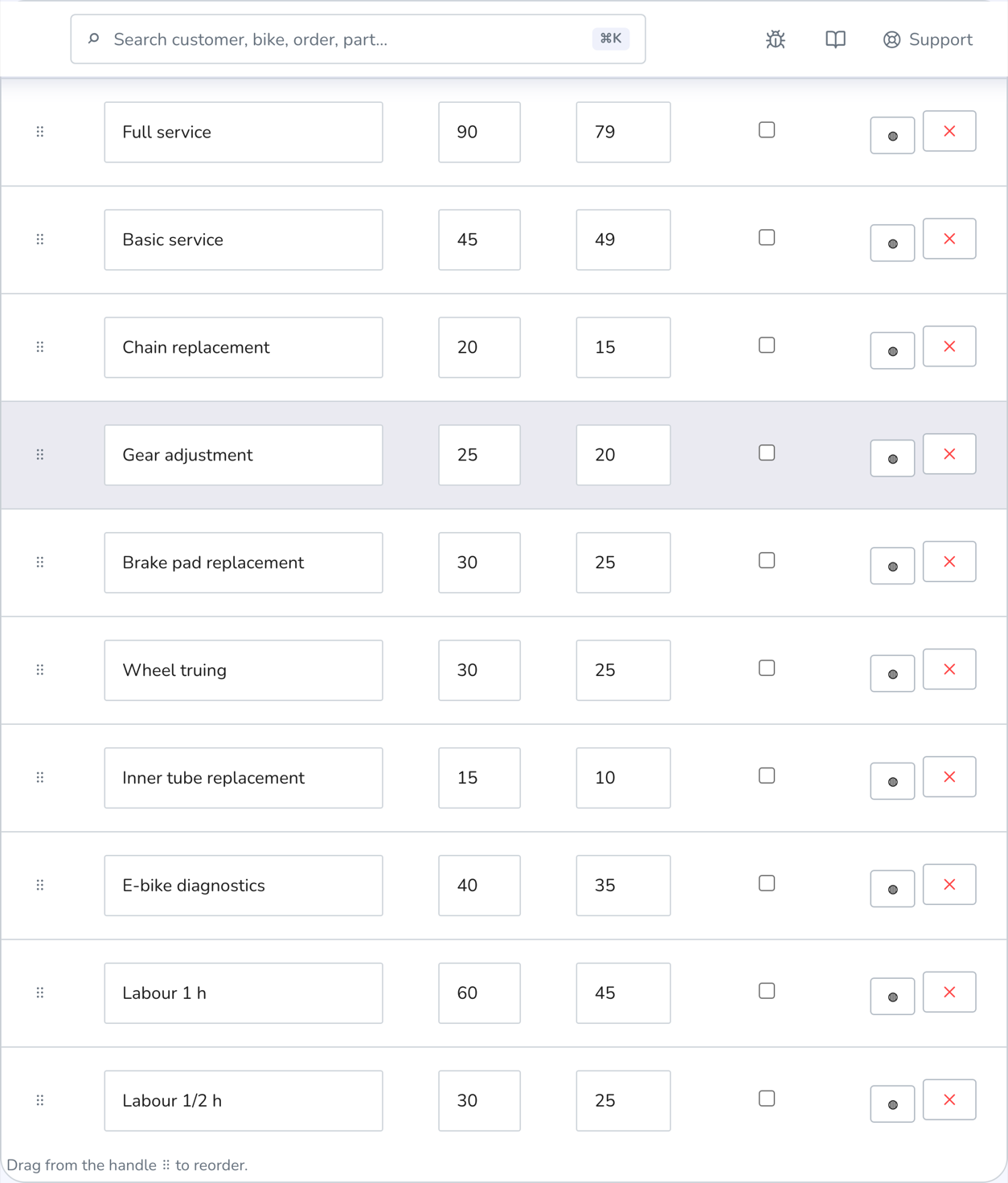
- The prices. The preloaded ones are an average, not a recommendation: your full service costs what it costs at your bench. Correct them row by row.
- The durations. They only really bite on bookable entries (see below), but keeping them honest gives you a believable diary.
- What you don't do. Deactivate or delete the jobs you don't offer, and add your specialities.
Editing the catalog doesn't touch quotes and orders already written, so you can get into it whenever you like without worrying.
If you've emptied the catalog completely, the page offers a Load default catalog button, which puts the starting set back in. That's the only time you see it: as long as even one entry exists — active or deactivated — the app offers nothing and never overwrites your work.
Adding and correcting an entry#
At the bottom of the page, the Add service card asks for three things: name, duration in minutes and price. Duration starts at 45 minutes — change it if the job wants more or less.
Entries already in the list are edited straight in the table: click into a field, type, and the button to save the row appears. Every row also has:
- Deactivate — hides the entry without losing it. Use it for seasonal work or for jobs you've stopped doing: if they come back one day, you switch them on again.
- Delete — removes it entirely, after a confirmation.
The “Bookable” tick#
Every entry has a Bookable tick. Ticked, the job is also offered to customers on the portal: it's what they see when they ask for an appointment.
Preloaded entries start out not bookable, for a simple reason: before offering a job online it's worth having your own price on it. Once the prices are right, tick the two or three jobs you want customers to book by themselves — together with your opening hours, that's what opens up online bookings.
This is where duration stops being a note to self and becomes a constraint: it's the time the calendar blocks when a customer books that job. A wrong duration on a bookable entry will either overfill or empty your diary. See bookings and customer portal and widget.
Provided by#
The Provided by column ties the entry to a role: bike fitting to the bike fitter, a posture assessment to the physiotherapist, a consultation to the nutritionist. Empty means “anyone on the staff”. Two effects:
- a booking for that service is assigned to someone with that role — that's how an external collaborator finds their own appointments;
- on days where you've filled in shifts, the service can only be booked while someone with that role is on shift and free for its whole length. On days without shifts the usual capacity applies, the one based on opening hours.
The order of the entries#
The order of the table is the order in which jobs are offered to you while you work. You change it by dragging the ⠿ handle on the left of the row: the new order is saved straight away.
Put the three or four jobs you do every day at the top. It's a small thing that saves you a scroll on every quote.
Common problems#
I can't see “Service price list” in settings.
It needs the manage_service_catalog permission. Without it the tab doesn't appear at all: ask whoever administers the workshop to grant it.
The catalog was already there and the prices aren't mine.
That's expected: the preloaded catalog is a starting point, not a price recommendation. Correct the prices row by row in the table, and deactivate the jobs you don't do.
I deleted everything and now the catalog is empty.
The page shows a Load default catalog button, which puts the starting set back in. From there you start personalising again.
A job doesn't show up among the bookable options on the portal.
Check two things: that the entry is active (deactivated ones are greyed out) and that it has the Bookable tick.
I deleted an entry I was using by mistake.
It has to be recreated by hand. That's why, when a job might come in useful again, it's better to deactivate it than delete it. Quotes and work orders already issued are untouched either way.